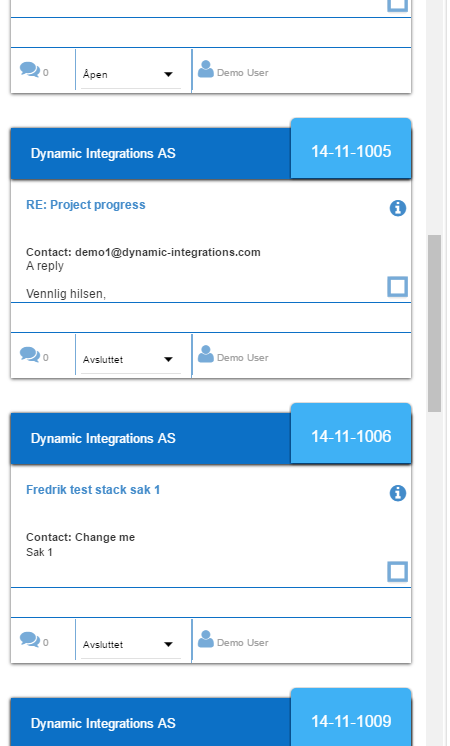
Create a ticket
If you have created an account you can now start creating tickets.
Open up SmartDialog and click the create new ticket button at the top toolbar.

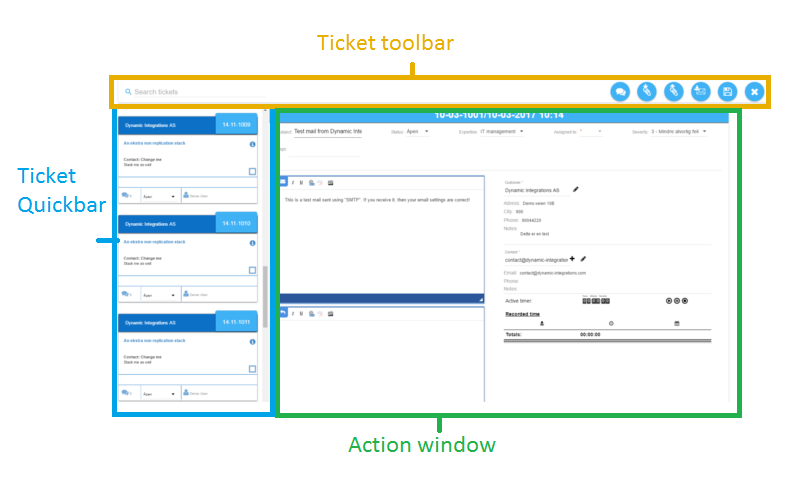
(Here you see an example ticket and the ticket quickbar on the left side. )
This is the ticket view. Since you clicked the "new ticket" button the ticket windows needs some information. Begin with a ticket subject, then continue along and add the "Case status", "Expertise", assign an agent to the case and select the "severity".
Now select a customer and a contact for the ticket. Fill in the description and click the save button.

Hooray! You just created your first ticket!
(There is no requirement to which order you add these, but all selections with a * in it is a required field that must be selected or filled before you can save the ticket)
More detailed information about the ticket view:
Ticket toolbar

As you can see on the top, the content of the toolbar has now changed and consists of tools useful in your ticket.
Action window
The action window contains all the settings and information for the current ticket.
Upon creating a new ticket, you need to fill inn the required fields before you can save the newly created ticket, if any fields are missing you will be prompted on that field. If you are using a template to create the ticket, the main required fields are filled in for you, though you still need to fill in the customer name and agent.
(This layout can be edited by the administrator or by yourself and may or may not contain other fields than what you see in this example.)
Ticket quickbar
From the ticket quicbar you can quickly access your other tickets withouth having to go back to the main interface. If you recieve an update to a ticket you own you will see that from the ticket quickbar. You can offcourse hide this by clicking the hide quickbar icon. If you would like to hide this permanently you can do so via the user settings. (not all user settings are ready at the moment)